

May 12, 2026
Many Canadian organizations are using an email platform that no longer fits their needs. Support is slow, emails are missing from inboxes, the editor is unreliable, or the overhead of managing a tool built for marketing has become impossible to justify.
This guide shares a practical framework for shortlisting and evaluating email platforms, based on what we have heard from hundreds of organizations across our sales conversations and demos.
In this post
- Build your requirements list before you look at platforms
- Table stakes: what most platforms get right
- What criteria actually separates email platforms at the shortlist stage?
- How one Canadian team went from 13 platforms to a shortlist of 4
- What to verify about Canadian data storage and security
- What is mandatory messaging, and why can most platforms not do it?
- Questions to ask in every demo
- What a real internal evaluation looks like
1. Build your requirements list before you look at platforms
Starting with a platform comparison instead of a requirements list is the most common mistake in a software evaluation, and it costs teams weeks of unnecessary demos. Before you look at a single pricing page, write down what your organization actually needs the tool to do. It is also worth considering what your procurement team will need to see, and building those criteria in from the start.
Based on what we hear consistently from organizations evaluating Envoke, here are the twelve requirements that come up most often. The first six are table stakes, most platforms meet them. Requirements seven through twelve are where evaluations actually break down, and where you should spend most of your time.
- Referenceable customers and case studies from similar organizations. Look for customers in your sector, not just logos. A post-secondary institution and a retail brand have very different communication needs.
- Easy to use, with minimal training required for new staff. If the platform requires significant onboarding every time someone new joins your team, that overhead compounds over time.
- Emails that are accessible, on brand, and look professional. Templates should support your brand standards, and emails should meet accessibility requirements out of the box.
- Flexible subscription management that gives contacts meaningful choices. Contacts should be able to manage their own preferences without having to unsubscribe from everything at once.
- Automated list sync with CRM or HR systems. Manual list management creates errors and wastes time. Look for a platform that stays in sync with your source of truth.
- Secure infrastructure that your IT team and compliance officer both approve. Certifications, audit reports, and data handling practices should be verifiable, not self-certified.
- A clutter-free interface that does not include features your team will never use. Features your team does not need are not neutral. They slow onboarding, create confusion, and make routine tasks harder.
- Affordable and predictable pricing with no surprise overages. Some platforms charge by sends rather than contacts, or increase pricing as your list grows without warning.
- Data stored in Canada. For public sector organizations, health agencies, and associations, this is often a legal requirement under PIPEDA, FOIP, or FIPPA, not a preference.
- The ability to send important communications to contacts even if they have unsubscribed from optional emails. This is mandatory messaging, and most platforms cannot do it. It is covered in full in section 6.
- Fast, human support with reasonable response times. A platform with real people available by phone or video call is worth paying for if you cannot afford a failed send.
- Bonus: accessible leadership who listen to product feedback and are willing to discuss the roadmap. For smaller organizations especially, this kind of relationship with a vendor matters when something goes wrong.
Run this list past your key stakeholders before you start evaluating. Sharing it with IT, finance, and the communications team members who will use the platform daily will surface disagreements early, before you have invested time in demos.
2. Table stakes: what most platforms get right
Most established email platforms meet requirements one through six, and you should not spend significant evaluation time on these criteria alone. Drag-and-drop editors, mobile-responsive templates, DKIM authentication for deliverability, reporting dashboards, and common CRM integrations are broadly available across the market.
CASL compliance is also broadly supported. Platforms including Envoke, Cyberimpact, Constant Contact, and Mailchimp all handle consent tracking and unsubscribe management in ways that support CASL compliance. If a vendor cannot demonstrate this clearly, remove them from your list immediately.
The distinction that matters is not whether a platform handles these basics. It is whether the platform was built for your kind of organization or adapted to fit it. As one Envoke customer put it: “Mailchimp does everything OK. Envoke does email really well.”
3. What criteria actually separates email platforms at the shortlist stage?
Requirements 7 through 12 are where most shortlists collapse. Platforms that perform well on the basics often fall short once you get into pricing structure, data residency, interface complexity, and support quality. These are the criteria worth spending the most time on.
Clutter-free interface
Many platforms try to serve every possible user, from e-commerce brands running abandoned cart sequences to enterprise sales teams managing multi-branch automations. For communicators whose job is to build, send, and report, that added complexity creates friction. Features you will never use are not neutral. They slow onboarding, confuse new staff, and make routine tasks harder than they need to be.
Predictable pricing
Email platform pricing varies widely and is not always straightforward. Some platforms charge by sends rather than contacts. Others charge more as your list grows, with no warning until the invoice arrives. Look for a platform that prices on contacts, bills in Canadian dollars, and gives you a clear picture of what you will pay at your current list size and at double that size.
Canadian data storage
For public sector organizations, post-secondary institutions, health agencies, and associations, this is not a preference. It is often a legal requirement. PIPEDA, FOIP, FIPPA, and other provincial privacy laws create clear obligations around where personal data is stored and processed. Verify that any platform you evaluate stores data on servers physically located in Canada, and ask whether that includes all backups and logs, not just the primary database.
Learn more about Envoke’s Canadian data storage here.
Mandatory messaging
This is the requirement most platforms simply cannot meet, and it is discussed in detail in section 6 below.
Support quality
Support quality is difficult to evaluate from a pricing page. Ask specifically about response times for urgent issues, whether support is available by phone or video call, and whether onboarding is included or billed separately. A platform that costs slightly more but has real humans answering the phone is usually worth it for organizations that cannot afford a failed send.
4. How one Canadian team went from 13 platforms to a shortlist of 4
Applying a requirements list before running a single demo can cut a long list of platforms to a manageable shortlist in an afternoon. One of our customers shared their evaluation process with us, and it is a useful illustration of how quickly that filter works.
They started with 13 platforms. Their first filter was simple: does this platform include features we will never use, such as e-commerce integration, website builders, complex sales automation with multiple branches, cold email prospecting, social media lead generation, or customer journey mapping?
Mailchimp, Constant Contact, ActiveCampaign, Campaign Monitor, and Brevo were all ruled out at this stage. They are primarily marketing tools, and the team’s needs were communication-first. Campaigner was removed after a review of third-party ratings and user feedback.
That left a shortlist of two: Envoke and Cyberimpact. The final two were re-entered because of specific features under review, but the team had cut the list from 13 to 4 without a single demo.
Envoke came out on top for four reasons: support available via scheduled Zoom calls, the option to send mandatory emails, straightforward pricing, and a security scorecard stronger than that of the other platforms evaluated.
5. What to verify about Canadian data storage and security
Canadian data storage is a requirement for many organizations, but asking “do you store data in Canada?” is not enough. The more important question is whether the vendor owns the infrastructure or rents it from a third-party cloud provider such as AWS or Google Cloud.
Some platforms route Canadian customer data through Canadian AWS regions, which means the data is geographically in Canada but the infrastructure is owned and operated by a US company. For organizations with strict data sovereignty requirements, that distinction matters and is worth verifying explicitly before you sign.
You can also use SecurityScorecard to look up any vendor’s publicly visible security posture, covering DNS health, patching cadence, and data exposure signals. It takes five minutes and often surfaces issues before you invest time in a demo.
Envoke has owned and operated its own servers in Toronto and Montreal since 2007. Data never leaves Canada and never touches a third-party cloud.
6. What is mandatory messaging, and why can most platforms not do it?
Mandatory messaging is the ability to send emails to contacts who are legally or contractually required to receive them, even if those contacts have previously unsubscribed. It is not available on Mailchimp, Constant Contact, Cyberimpact or any other mainstream email marketing platform.
Most platforms are built on the assumption that every contact is a potential customer who can always opt out. That model does not reflect how public sector communicators work. A university must notify enrolled students of a registration hold regardless of their email preferences. A regulatory body must reach active licensees with a compliance notice whether or not they unsubscribed from the last newsletter. A municipality must deliver a bylaw change notice to affected residents regardless of their subscription status.
The reason most platforms cannot offer mandatory messaging is that they were never built for this use case. They are designed to help companies acquire customers and drive conversions, so the unsubscribe logic baked into their architecture assumes every contact can always opt out. That assumption is incompatible with legal and contractual communication obligations.
Without mandatory messaging, organizations are forced into manual workarounds: exporting lists, sending through Outlook, maintaining separate distribution groups outside the platform. It defeats the purpose of using an email platform entirely.
In Envoke, Mandatory Messaging is a toggle you turn on when composing a message. You provide the contractual or regulatory reason for the send, along with a link to a verifying document. That reason and link appear in the footer of every mandatory email, so recipients understand why they are receiving it. Contacts can submit a removal request, which an admin reviews individually, but they cannot self-serve unsubscribe.
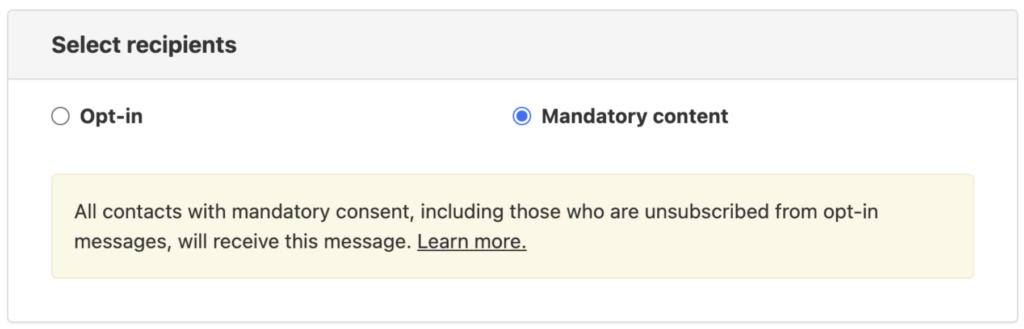
The University of Alaska system office manages communications across three separately accredited institutions with approximately 7,000 employees. They evaluated Workshop and ContactMonkey before choosing Envoke, with mandatory delivery being the single most critical feature in their decision.
7. Questions to ask in every demo
A demo is your opportunity to surface the things a pricing page will not tell you. Here are the questions worth asking every platform you evaluate.
On data and compliance: Where exactly is our data stored? Is it on your own infrastructure or a third-party cloud? What certifications do you hold, and can you share the most recent audit report?
On mandatory messaging: Can contacts who have previously unsubscribed still receive emails we are legally required to send? How is that handled, and how do we document compliance?
On support: What is your response time for urgent issues? Can we reach someone by phone or video call, or is support limited to email and chat? Is onboarding included, or billed separately?
On pricing: How is pricing calculated? Does it change as our contact list grows? Are there overage charges? Do you bill in Canadian dollars?
On the interface: Can we see a live send workflow from draft to delivery? What features would we have access to that our team would never use?
The answers to these questions will tell you more about fit than a feature comparison ever will.
8. What a real internal evaluation looks like
Getting internal buy-in for a platform switch often requires more than a personal recommendation. IT needs to approve infrastructure and security. Finance needs to approve the cost. Leadership needs to see that the evaluation was thorough and the decision is defensible.
One communications team we work with built an internal presentation to take their evaluation to leadership. It followed a simple arc: here is what our current platform cannot do, here is where we want to go, here is what we looked at, here is how we compared them, and here is our recommendation. They used a feature comparison table across eight platforms to show the methodology and ranked their top four on the criteria that mattered most to their organization.
That kind of documentation is worth building even if you are the decision-maker. It creates a clear record of why you chose what you chose, and it protects you if the decision is ever questioned. It also forces you to articulate your requirements clearly, which usually surfaces one or two criteria you had not thought to include.
If you are preparing a similar internal evaluation, download our vendor comparison template that acts as a framework you can adapt for your own shortlist.
Frequently asked questions
Do all email platforms support CASL compliance?
Most established platforms handle the basics of CASL compliance, including consent tracking, unsubscribe management, and suppression lists. However, CASL compliance is not the same as full support for all the communication types your organization sends. Platforms built for commercial email marketing may not handle non-commercial or mandatory communications correctly by default.
What is the difference between data stored in Canada and data hosted on Canadian servers?
Some platforms store data in Canadian AWS or Google Cloud regions, which means the data is geographically located in Canada but processed on infrastructure owned by a US company. For organizations with strict data sovereignty requirements, vendor-owned Canadian infrastructure provides stronger guarantees. Always ask whether the vendor owns the servers or rents them from a third-party cloud provider.
How do I evaluate email platform support quality before I buy?
Ask directly during the demo about response times for urgent issues, whether support is available by phone or video call, and whether onboarding is included. You can also check G2, Capterra, and third-party review sites for patterns in support complaints. A platform with consistently poor support reviews is unlikely to improve after you sign.
What should I do if a contact has unsubscribed but must still receive certain communications?
This is the use case that mandatory messaging is designed to solve. If your platform does not support mandatory messaging natively, you will need to manage these contacts through a separate workflow, typically an Outlook distribution list or a manual export process. This creates compliance risk and administrative overhead. Evaluate whether your platform of choice can handle this before you commit.
Is Envoke only for large organizations?
No. Envoke’s contact-based pricing means you pay for the contacts relevant to your current use case, not for a full enterprise seat. The University of Alaska system office launched with a focused campaign of approximately 2,300 contacts before expanding, which made internal budget approval straightforward. Envoke works for teams at any size as long as their primary need is reliable, compliant communication rather than marketing automation.
Related Articles:
About the Author
Zoltan Wagner is a Product Manager at Envoke with over 15 years of experience in product development, specializing in email marketing technology and leading iterative improvements that enhance platform usability and performance.